iPhone App · Free to Download

Build the fastest path to becoming debt-free.

Organize every account, compare payoff strategies, preview loans before borrowing, and build a smarter path to becoming debt-free—all without connecting your bank account.

Free to download No bank login required Private by design iPhone
Download on the App Store

Free · No bank login · Private · iPhone
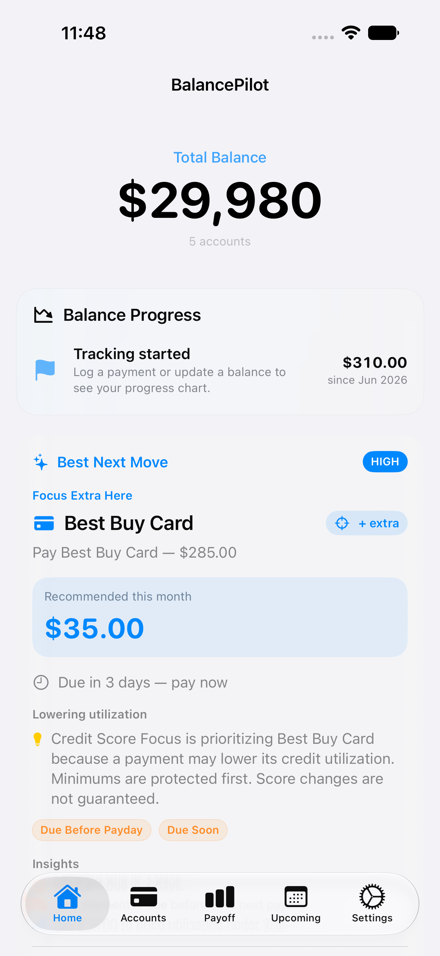
BalancePilot home screen showing debt overview, best next move, and payoff progress
Accounts

Manage every account
with clarity.

Track balances, APRs, due dates, minimums, available cash, and protected cash from one organized view.
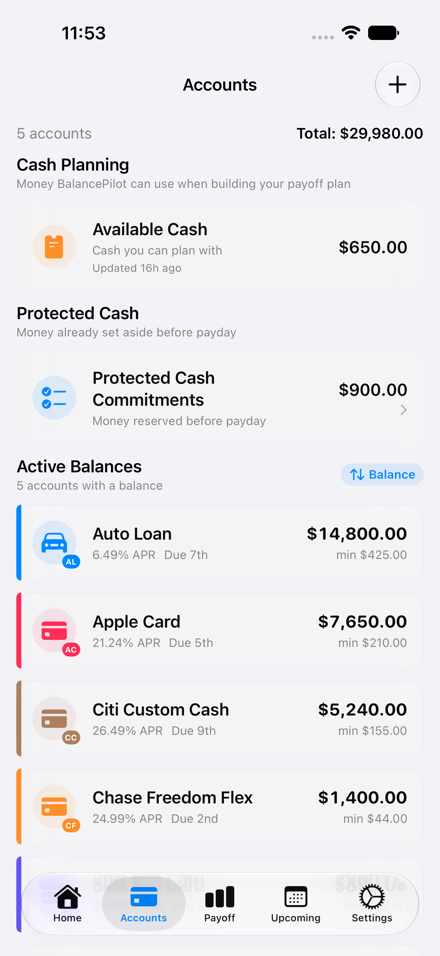
Balance & APR at a glance
See your current balance, interest rate, and credit limit for every card and loan — no guessing.
Due dates & minimums
Stay ahead of every payment with due date tracking and minimum payment reminders built in.
Available & protected cash
Know exactly how much you can spend and how much is reserved — so you never overdraft.
BalancePilot accounts screen showing balances, APRs, and due dates
Payoff Plan

See your debt-free
future.

Plan smarter with Avalanche, Snowball, Smart Hybrid, and Credit Score Focus. Compare payoff strategies, protect minimum payments, and preview your debt-free timeline before making another payment.
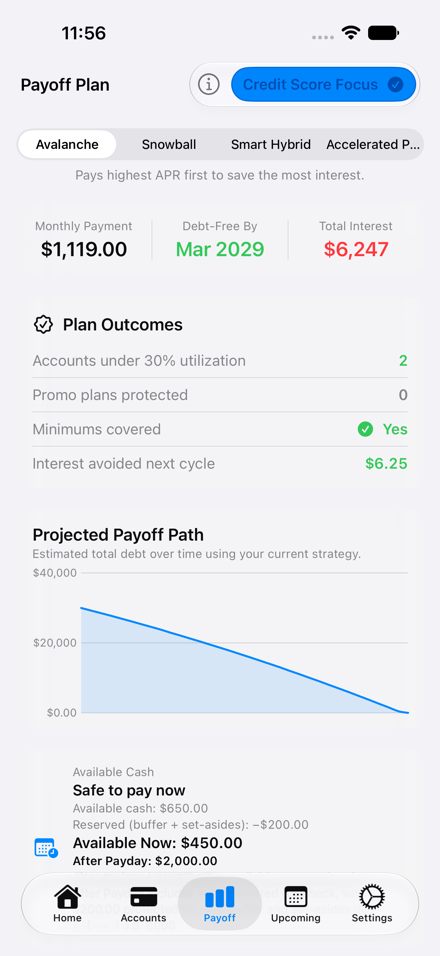
Compare Strategies
Choose Avalanche, Snowball, Smart Hybrid, or Accelerated Payoff — see which saves the most.
Visual Payoff Timeline
Watch your projected debt decrease over time with a clear month-by-month breakdown.
Credit Score Focus
Reduce utilization sooner while protecting required minimum payments on all accounts.
BalancePilot payoff plan screen showing debt-free date, strategy comparison, and projected timeline
Loan Impact Preview

Borrow with
confidence.

See how any loan changes your monthly payment, payoff timeline, total debt, and long-term financial plan before you commit.
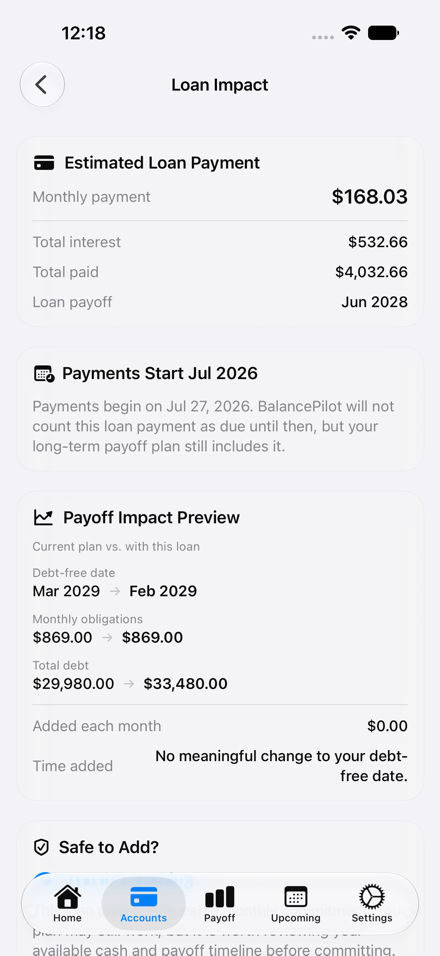
Preview Before Borrowing
See the real financial impact before accepting a loan offer.
Debt-Free Forecast
Understand how borrowing changes your payoff timeline before signing.
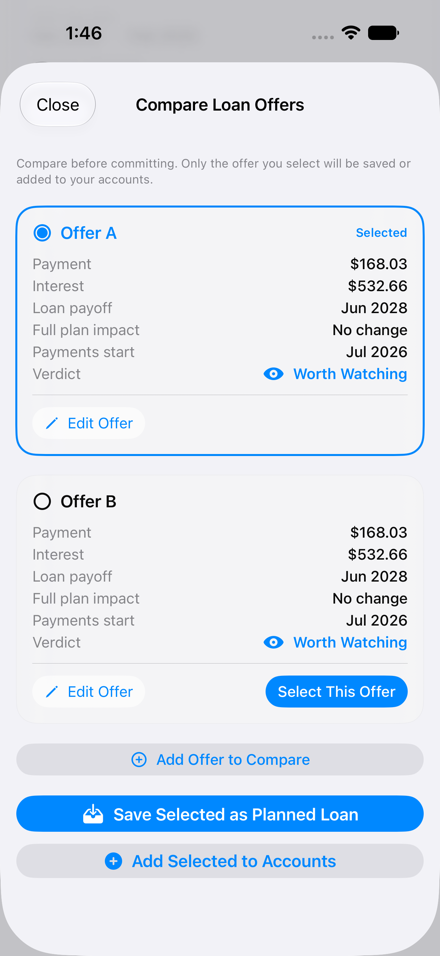
Compare Multiple Offers
Evaluate multiple loan offers side-by-side before making a decision.
BalancePilot loan impact preview screen showing monthly payment, timeline, and total interest
BalancePilot compare loan offers screen showing side-by-side loan comparison
COMPARE LOAN OFFERS

Choose the best loan, not just the cheapest.

Compare multiple loan offers side-by-side before committing. See how different monthly payments, interest costs, payoff dates, and long-term financial impact affect your debt payoff strategy before selecting the option that's right for you.
Side-by-Side Comparison
View multiple loan offers together to immediately see which terms serve your payoff goals best.
Save the Best Option
Bookmark your preferred offer and return to it anytime while you continue shopping around.
Plan Before You Commit
Understand the full cost of each loan over time so you commit with confidence, not guesswork.
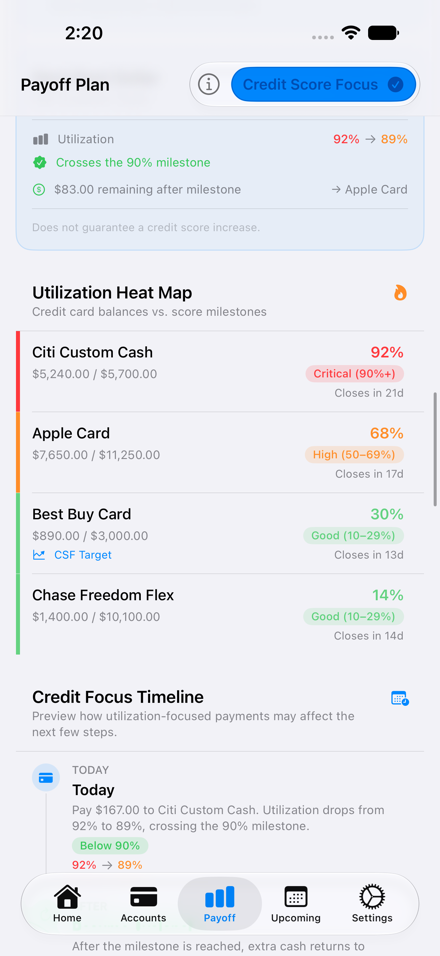
BalancePilot credit score focus screen showing utilization heat map and milestone targets
Credit Score Focus

Plan for your credit score,
not just payoff.

BalancePilot can prioritize utilization milestones, identify high-impact cards, and adjust your payoff order while protecting minimum payments first.

Utilization Heat Map
See which cards are above key utilization thresholds at a glance.
Milestone-Based Payments
Target 90%, 70%, 50%, and 30% utilization levels in sequence.
Minimums Protected
Required payments are covered before any extra cash is redirected.

Everything you need to take control.

From tracking balances to comparing loans, BalancePilot helps you build a smarter path toward becoming debt-free.

Plan
Smart Payoff Planning
Credit Score Focus
What-If Planning
Borrow
Loan Impact Preview Pro
Compare Loan Offers Pro
Planned Loans Pro
Stay Organized
Accounts
Calendar
Statement PDF Analyzer Pro
Understand
Utilization Heat Map
Payoff Timeline
Monthly Progress

Designed for people serious about paying off debt.

No Bank Login Required
Your financial information stays on your device. BalancePilot never requires you to connect to your bank or share any credentials.
Private by Design
No account linking. No bank credentials. No unnecessary permissions. What you enter stays with you.
Built Around Strategy
BalancePilot recommends where your money has the biggest impact — across Avalanche, Snowball, Hybrid, and Credit Score Focus approaches.
Preview Before You Commit
Understand the full consequences before borrowing money. See how any loan affects your payoff timeline before you sign anything.

Choose the experience that's right for you.

Free
Core Planning
Everything you need to organize accounts and start building your payoff plan from day one.
Manual accounts
Payoff planning
Calendar
Available cash
What-if planning
Basic loan preview
Pro
Pro
Full Power
Advanced loan modeling, statement import, credit tools, and premium interface.
Everything in Free, plus
Premium UI
Statement Import
Compare Loan Offers
Loan Impact Preview
Planned Loans
Future premium features
Subscription details shown before purchase. Try free first.

Your financial data stays yours.

No Bank Connection
BalancePilot never requires connecting to your financial institution. No account linking of any kind.
On-Device First
Your plans stay on your device. Nothing is transmitted to external servers without your knowledge.
iCloud Sync (Premium)
Your information syncs securely using your personal iCloud account — not BalancePilot's servers.
No Ads
No tracking. No selling your financial information. No advertising of any kind inside the app.

Frequently Asked Questions

No. BalancePilot never connects to your bank. You manually enter your account balances, APRs, due dates, and available cash. This is intentional — you stay in complete control of your financial information at all times.

Yes — with Pro. Statement Import lets you import supported credit card PDFs directly on your device. The processing happens locally and is never sent to any server. Currently supports major US card issuers.

Yes. Because everything is manual and stored on your device, BalancePilot works fully offline. No account required, no internet connection needed to use any of the core planning features.

Yes — with Pro. The Compare Loan Offers feature lets you enter multiple loan scenarios side by side and see exactly how each affects your monthly payment, total interest paid, and debt-free date before you commit.

No. Credit Score Focus is a planning tool that helps you reduce credit utilization — a factor that typically influences credit scores. However, credit scores depend on many variables outside the app's control. BalancePilot is not a credit service and makes no guarantees about score outcomes.

Pricing is shown in the App Store before any purchase is made. BalancePilot is free to download and use for core features. Pro unlocks advanced loan tools, statement import, and premium interface options. You can try the free version first with no commitment required.

Yes. Pro is managed entirely through Apple's standard subscription system. You can cancel at any time through your iPhone's subscription settings. Your data stays on your device regardless of subscription status.

Start building your
debt-free future today.

BalancePilot helps you organize your accounts, build smarter payoff plans, compare loan offers, and make financial decisions with confidence.

Free to download
No bank login required
Privacy first
iPhone

BalancePilot is a planning tool, not financial advice.

Payoff estimates and loan previews are based on information you enter and are for planning purposes only. Always verify balances, APRs, due dates, and payment requirements with your lender. Consult a qualified financial professional for decisions specific to your situation.